> ## Documentation Index
> Fetch the complete documentation index at: https://docs.telomatrix.com/llms.txt
> Use this file to discover all available pages before exploring further.

# 消息中心

## 功能说明

消息中心汇总 TM 安全云网日常运维中需管理员知晓或干预的信息和事件，包括：终端审批任务、动态策略确认、系统告警信息、策略计算任务。

在 TMC 任意页面右上角点击 <img src="https://mintcdn.com/telo-matrix/Ts1PGvgxgyk1wMee/images/2_Configuration_Guide_TM-Lite2.0.9.x/2_Flexible_Usage/4_Daily_Operation/Message_Center/1.png?fit=max&auto=format&n=Ts1PGvgxgyk1wMee&q=85&s=927e694711a1bf00dfd9b022bcdbbc8d" alt="" width="31" height="30" data-path="images/2_Configuration_Guide_TM-Lite2.0.9.x/2_Flexible_Usage/4_Daily_Operation/Message_Center/1.png" /> 图标打开消息列表。

## 终端审批任务

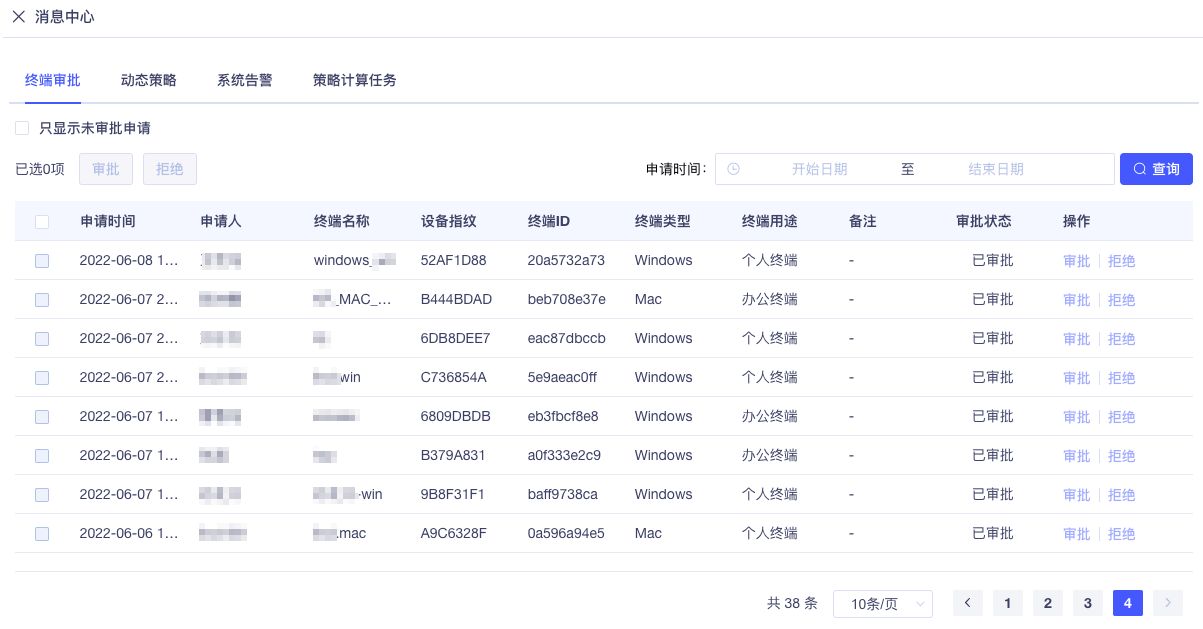
点击"终端审批"标签查看待审批终端信息：

<img src="https://mintcdn.com/telo-matrix/Ts1PGvgxgyk1wMee/images/2_Configuration_Guide_TM-Lite2.0.9.x/2_Flexible_Usage/4_Daily_Operation/Message_Center/2.png?fit=max&auto=format&n=Ts1PGvgxgyk1wMee&q=85&s=409e801465426c89049dff0e6efe6416" style={{width: "100%", display: "block", margin: "0 auto", border: "1px solid #e5e7eb", boxShadow: "0 2px 8px rgba(0,0,0,0.08)"}} width="1203" height="629" data-path="images/2_Configuration_Guide_TM-Lite2.0.9.x/2_Flexible_Usage/4_Daily_Operation/Message_Center/2.png" />

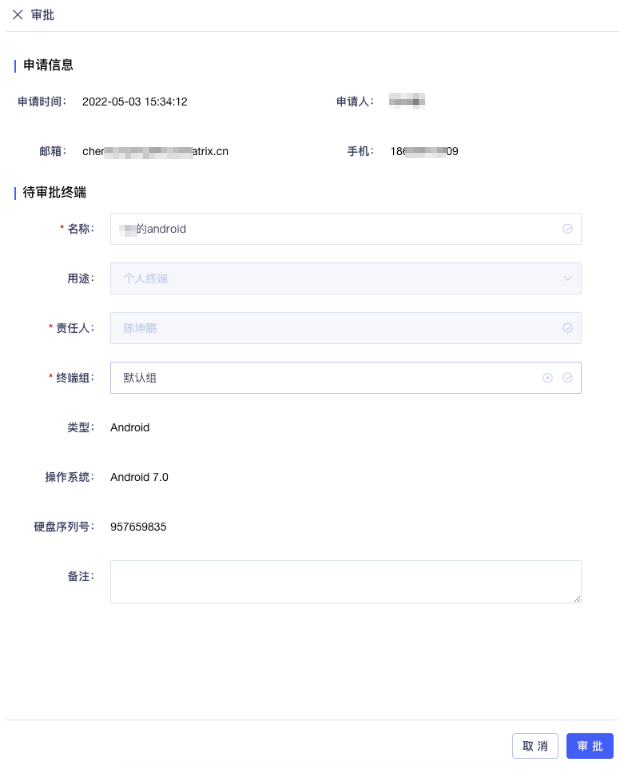
1. 点击"审批"按钮查看申请详情，可修改终端名称、用途、隶属终端组和备注：

<img src="https://mintcdn.com/telo-matrix/Ts1PGvgxgyk1wMee/images/2_Configuration_Guide_TM-Lite2.0.9.x/2_Flexible_Usage/4_Daily_Operation/Message_Center/3.png?fit=max&auto=format&n=Ts1PGvgxgyk1wMee&q=85&s=920db2e6745d4984b7d53dab7834f104" style={{width: "60%", display: "block", margin: "0 auto", border: "1px solid #e5e7eb", boxShadow: "0 2px 8px rgba(0,0,0,0.08)"}} width="624" height="772" data-path="images/2_Configuration_Guide_TM-Lite2.0.9.x/2_Flexible_Usage/4_Daily_Operation/Message_Center/3.png" />

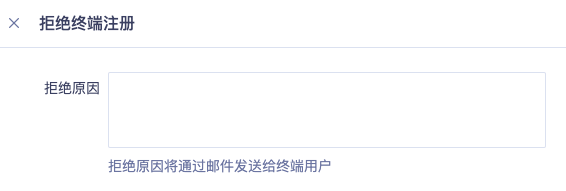
2. 点击"审批"完成审批。如需拒绝，点击"拒绝"并填写拒绝理由，申请人将收到包含拒绝理由的邮件：

<img src="https://mintcdn.com/telo-matrix/Ts1PGvgxgyk1wMee/images/2_Configuration_Guide_TM-Lite2.0.9.x/2_Flexible_Usage/4_Daily_Operation/Message_Center/4.png?fit=max&auto=format&n=Ts1PGvgxgyk1wMee&q=85&s=28ac328f1d516ce8f17370bac2d2cd09" style={{width: "50%", display: "block", margin: "0 auto", border: "1px solid #e5e7eb", boxShadow: "0 2px 8px rgba(0,0,0,0.08)"}} width="566" height="191" data-path="images/2_Configuration_Guide_TM-Lite2.0.9.x/2_Flexible_Usage/4_Daily_Operation/Message_Center/4.png" />

## 动态策略任务（TMPro功能）

TMI 采集终端环境数据和网络流量日志，通过 AI 算法以身份为中心学习行为基线，实时评估帐号和终端可信度。发现异常时自动通知 TMC 进行处置。

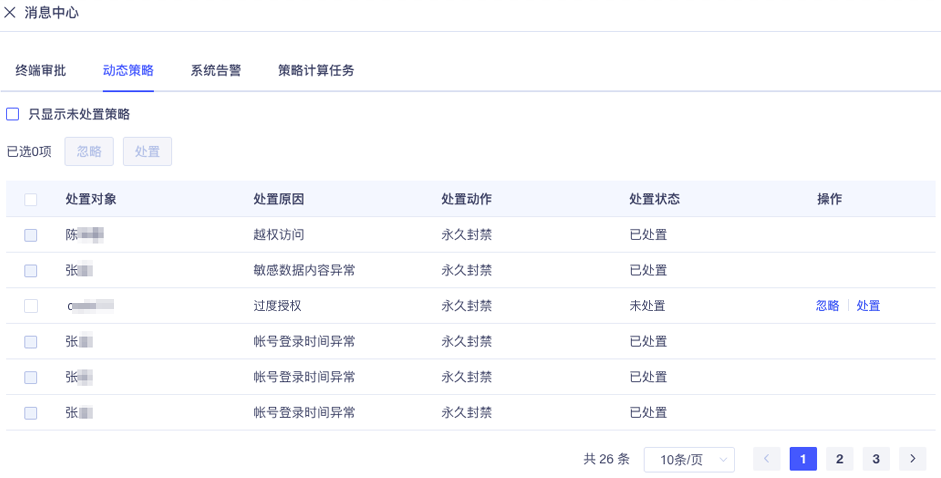
点击"动态策略"标签，若未在【策略管理】->【全局策略】中关闭自动执行，所有处置任务需管理员手动确认：

<img src="https://mintcdn.com/telo-matrix/Ts1PGvgxgyk1wMee/images/2_Configuration_Guide_TM-Lite2.0.9.x/2_Flexible_Usage/4_Daily_Operation/Message_Center/5.png?fit=max&auto=format&n=Ts1PGvgxgyk1wMee&q=85&s=f174dd310ce269ab24ea20791cc4a632" style={{width: "90%", display: "block", margin: "0 auto", border: "1px solid #e5e7eb", boxShadow: "0 2px 8px rgba(0,0,0,0.08)"}} width="941" height="478" data-path="images/2_Configuration_Guide_TM-Lite2.0.9.x/2_Flexible_Usage/4_Daily_Operation/Message_Center/5.png" />

点击"忽略"可忽略任务，点击"处置"并确认可立即执行处置并向 TMI 返回结果：

<img src="https://mintcdn.com/telo-matrix/Ts1PGvgxgyk1wMee/images/2_Configuration_Guide_TM-Lite2.0.9.x/2_Flexible_Usage/4_Daily_Operation/Message_Center/6.png?fit=max&auto=format&n=Ts1PGvgxgyk1wMee&q=85&s=98e05b3ff522a0570f7cd4d2d792711a" style={{width: "50%", display: "block", margin: "0 auto", border: "1px solid #e5e7eb", boxShadow: "0 2px 8px rgba(0,0,0,0.08)"}} width="415" height="173" data-path="images/2_Configuration_Guide_TM-Lite2.0.9.x/2_Flexible_Usage/4_Daily_Operation/Message_Center/6.png" />

## 系统告警信息

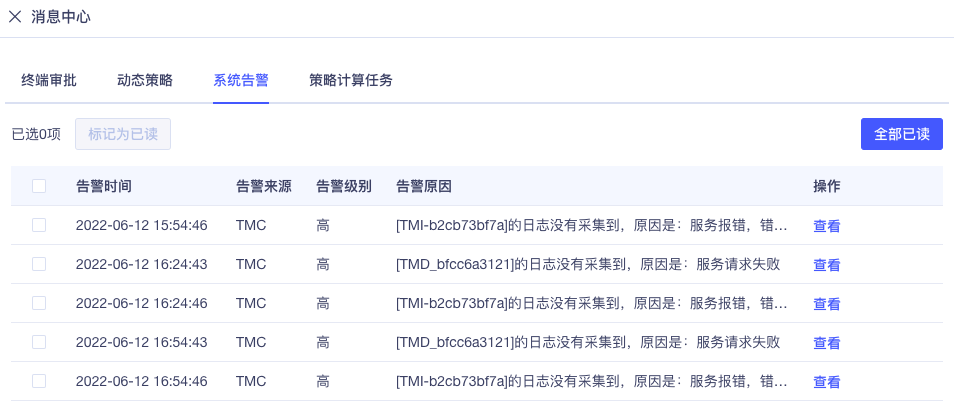
点击"系统告警"标签显示未被管理员查看过的中、高级别系统告警：

<img src="https://mintcdn.com/telo-matrix/Ts1PGvgxgyk1wMee/images/2_Configuration_Guide_TM-Lite2.0.9.x/2_Flexible_Usage/4_Daily_Operation/Message_Center/7.png?fit=max&auto=format&n=Ts1PGvgxgyk1wMee&q=85&s=cff5c17c35b6793b34cd1a8b84457066" style={{width: "90%", display: "block", margin: "0 auto", border: "1px solid #e5e7eb", boxShadow: "0 2px 8px rgba(0,0,0,0.08)"}} width="954" height="419" data-path="images/2_Configuration_Guide_TM-Lite2.0.9.x/2_Flexible_Usage/4_Daily_Operation/Message_Center/7.png" />

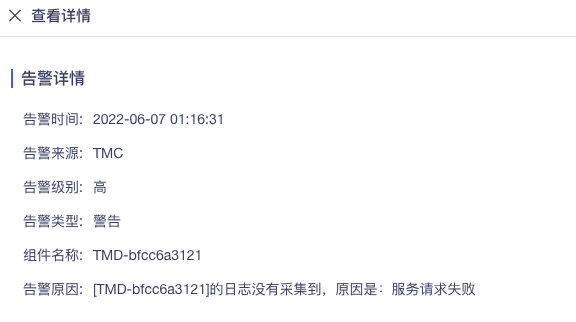
点击"查看"可查看告警详情：

<img src="https://mintcdn.com/telo-matrix/Ts1PGvgxgyk1wMee/images/2_Configuration_Guide_TM-Lite2.0.9.x/2_Flexible_Usage/4_Daily_Operation/Message_Center/8.png?fit=max&auto=format&n=Ts1PGvgxgyk1wMee&q=85&s=10bac10953b797b5d0e05acb27cd77bd" style={{width: "70%", display: "block", margin: "0 auto", border: "1px solid #e5e7eb", boxShadow: "0 2px 8px rgba(0,0,0,0.08)"}} width="576" height="322" data-path="images/2_Configuration_Guide_TM-Lite2.0.9.x/2_Flexible_Usage/4_Daily_Operation/Message_Center/8.png" />

消息中心仅显示未查看的告警，已查看的告警不再显示。查看所有历史告警请打开【系统日志】->【告警日志】。

## 策略计算任务

细粒度访问控制策略根据帐号、终端和业务资源的动态变化实时计算。帐号、终端、业务资源或授权策略变化时，TMC 自动生成策略计算任务并提交到计算引擎。

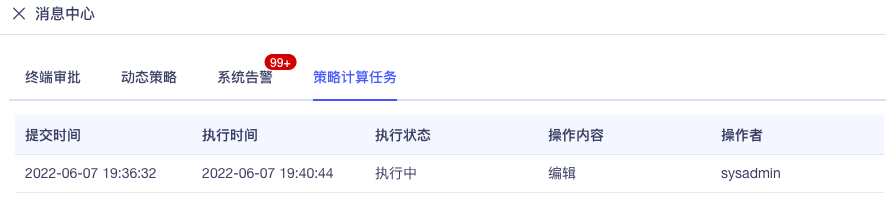
点击"策略计算任务"查看当前正在执行的计算任务：

<img src="https://mintcdn.com/telo-matrix/Ts1PGvgxgyk1wMee/images/2_Configuration_Guide_TM-Lite2.0.9.x/2_Flexible_Usage/4_Daily_Operation/Message_Center/9.png?fit=max&auto=format&n=Ts1PGvgxgyk1wMee&q=85&s=b882f8100e878734f6781e8d336eacd6" style={{width: "90%", display: "block", margin: "0 auto", border: "1px solid #e5e7eb", boxShadow: "0 2px 8px rgba(0,0,0,0.08)"}} width="886" height="202" data-path="images/2_Configuration_Guide_TM-Lite2.0.9.x/2_Flexible_Usage/4_Daily_Operation/Message_Center/9.png" />

列表仅显示计划中或正在执行的任务，已完成的任务不显示。